Track every expensein seconds.
Type it, scan the receipt, say it, or paste a bank SMS. Cortix SL files the expense, shows what is left this month, and tells you the day a budget runs out.

Free plan · No card needed · iPhone coming soon
- display currencies
- 9
- display currencies
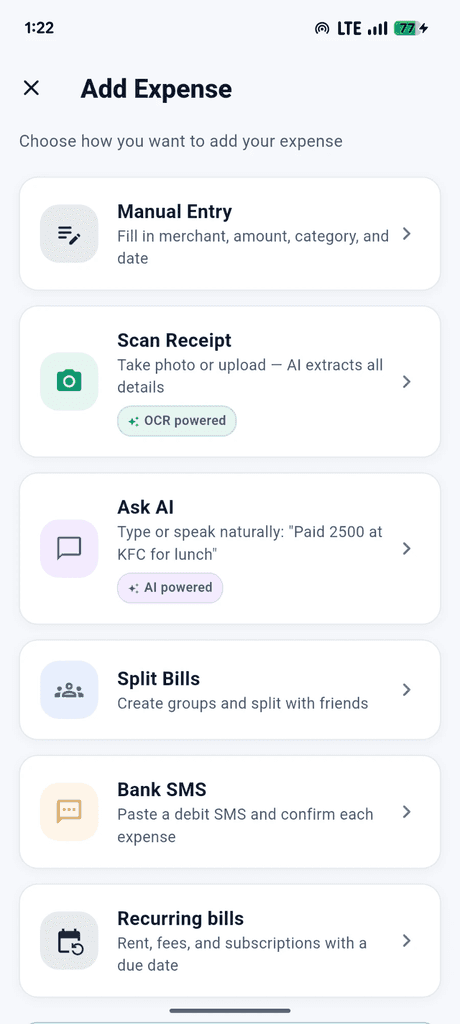
- ways to add: type, scan, speak, SMS
- 4
- ways to add: type, scan, speak, SMS
- export formats: CSV, Excel, PDF
- 3
- export formats: CSV, Excel, PDF
- ads in the app
- 0
- ads in the app
Features
Everything money needs. Nothing it doesn't.
Log spending the way it actually arrives, then see the month before it gets away from you.
Scan any receipt
Point your camera at a receipt. AI reads the merchant, amount and date. If the read is uncertain, the app asks you to check those fields before you keep it.
Illustrative example Say it, it's saved
Speak or type naturally — even several amounts at once. Speech is transcribed on your phone.
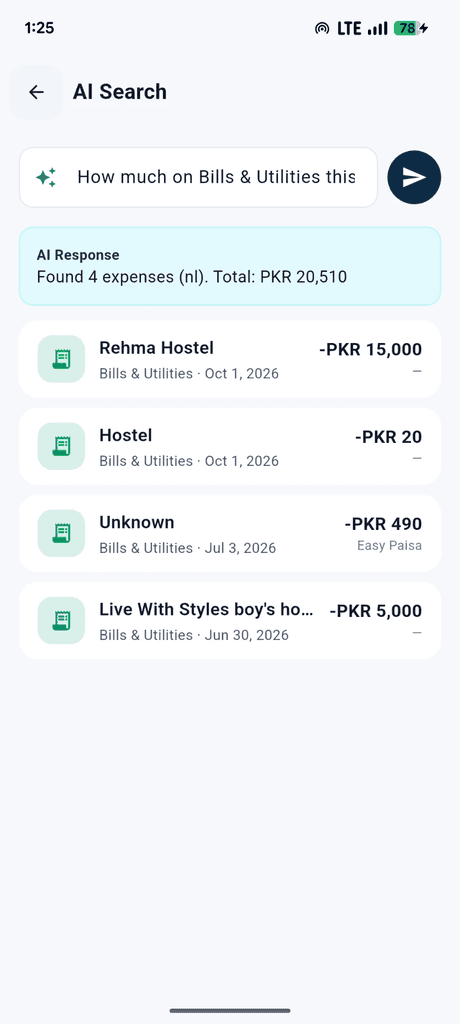
Ask your money anything
Plain-language questions, exact answers.
Trends at a glance
Daily, weekly, monthly and yearly charts with a category breakdown.
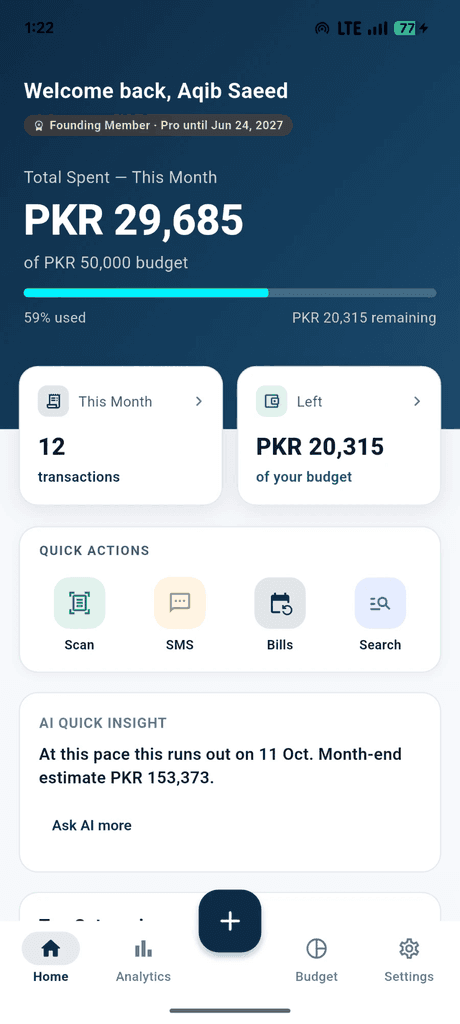
See the day a budget runs out
Set a monthly cap and category limits. Home shows what is left, and each budget shows the month-end estimate from this month's pace.
Split bills with friends
Equal, exact, percentage or shares — with tip, tax and who-owes-whom.
Accountant-ready exports
One tap to CSV, Excel or PDF.
Your currency, your theme
PKR, USD, EUR, GBP, AED, SAR, INR, CAD or AUD — auto-detected from your region. Light or dark.
Paste a bank SMS
Paste debit messages from your bank or wallet. Cortix pulls out the amounts. Credits are skipped, and nothing is saved until you confirm each row.
Bills that come back
Save rent, school fees and subscriptions with a next date. When one is due, add it to this month in one tap and the date moves forward.
Try it
Type an expense. Watch it file itself.
This is how quick-add feels in Cortix SL. Try one of the examples or write your own.
Inside the app
Designed to be opened every day.
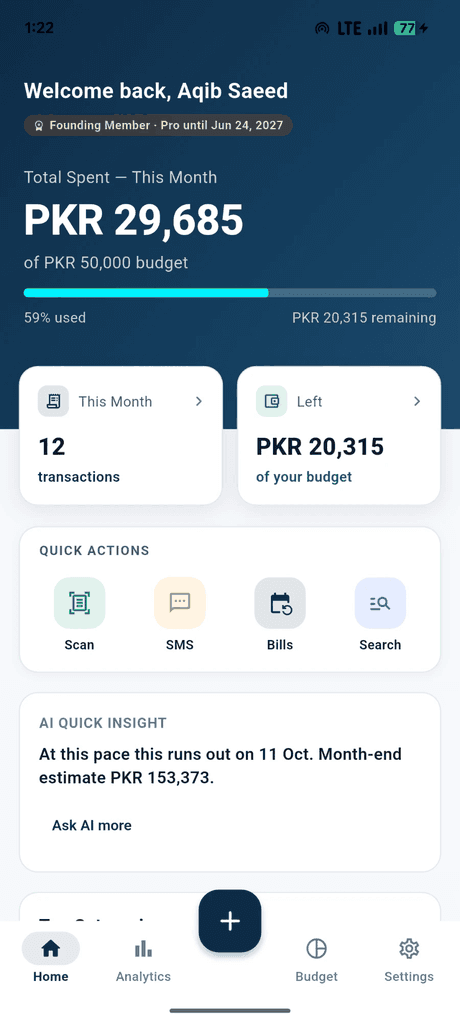
Real screens from Cortix SL on Android.
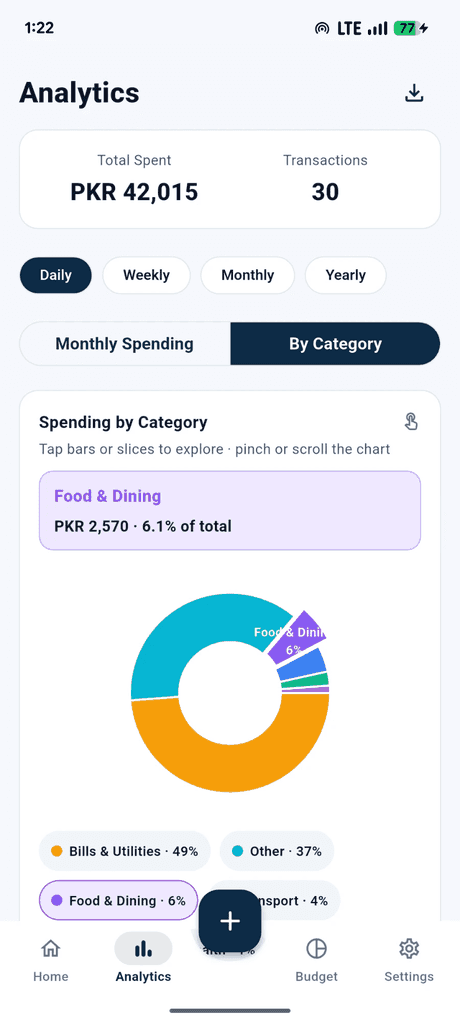
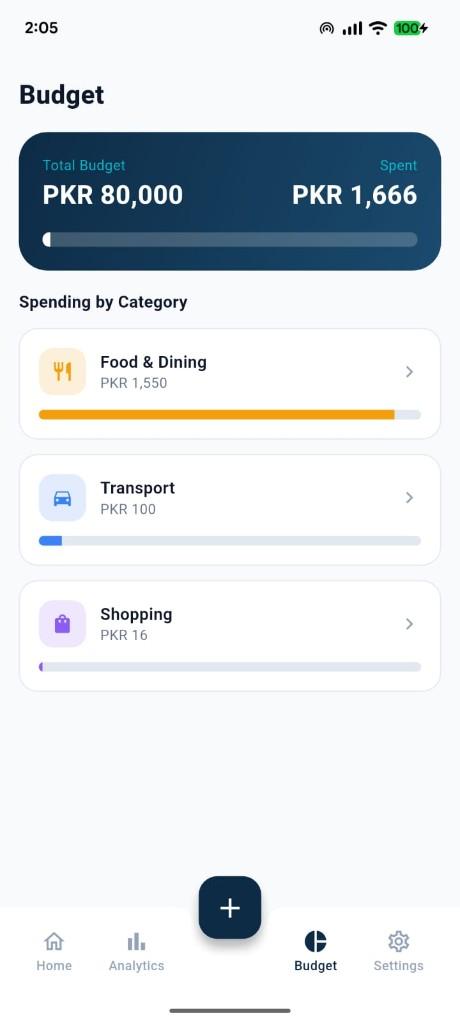
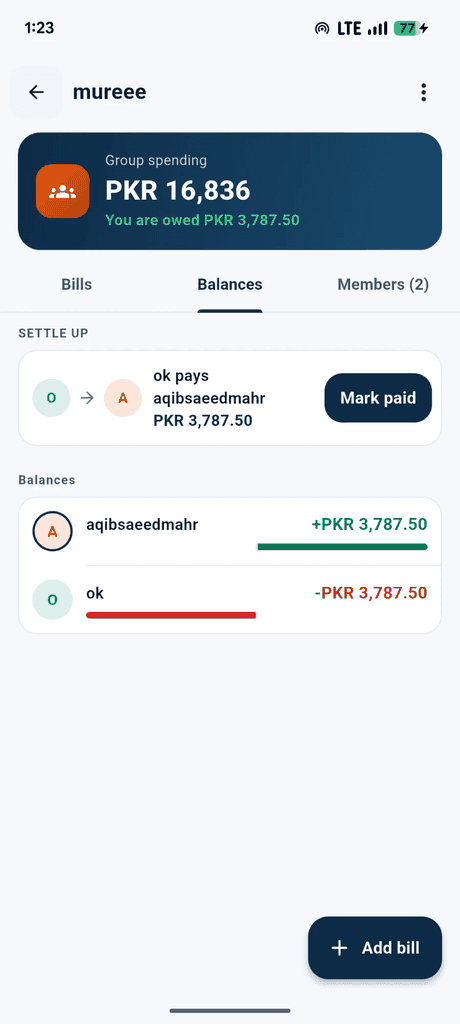
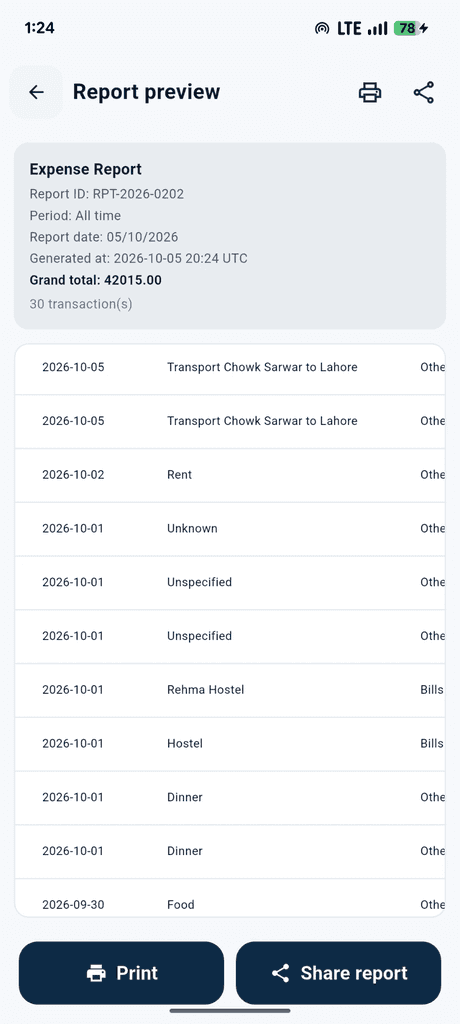
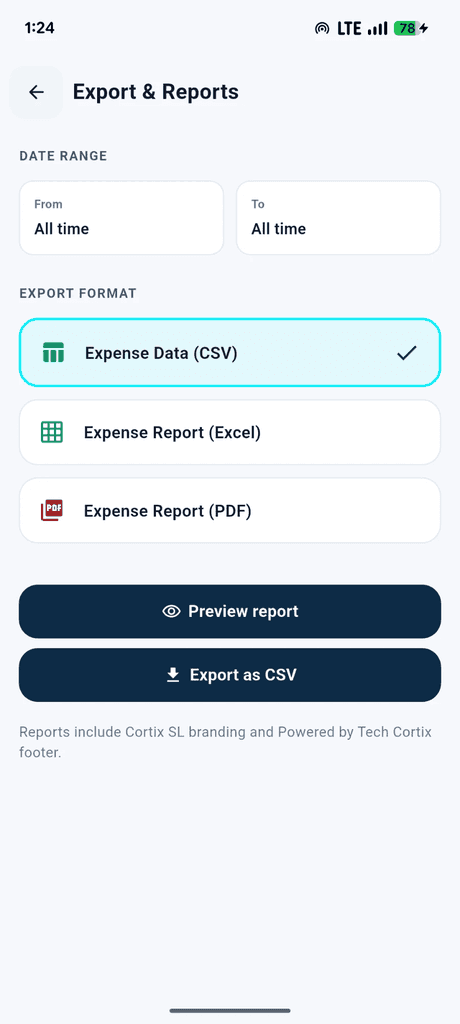
1 / 8
How it works
Up and running in a minute.
- 01
Install and sign up
Download Cortix SL on Google Play and sign up with email or Google. Early sign-ups become founding members automatically.
- 02
Add expenses your way
Type it, say it, scan the receipt, or paste a bank SMS. Cortix suggests the category — you confirm before it sticks.
- 03
Plan and ask
Set budgets, watch the day you'll run out, keep recurring bills, split a dinner, and ask “What did I spend on travel in March?”
Why switch
Faster than a spreadsheet. Smarter than a notebook.
| Feature | Cortix SL | Spreadsheet | Notes / paper |
|---|---|---|---|
| Add an expense in seconds | Included | Not included | Included |
| Read receipts automatically | Included | Not included | Not included |
| Add by voice | Included | Not included | Not included |
| Auto-categorise spending | Included | Not included | Not included |
| Budget alerts | Included | Manual formulas | Not included |
| See the day a budget runs out | Included | Manual formulas | Not included |
| Paste a bank or wallet SMS | Included | Not included | Not included |
| Recurring bills | Included | Copy the row | Not included |
| Charts without setup | Included | Manual | Not included |
| Ask questions in plain language | Included | Not included | Not included |
| Export for your accountant | Included | Included | Not included |
Pricing
Start free. Upgrade when it pays for itself.
No card needed to start. No ads, ever.
Founding members get Pro free for 12 months.
The first 100 people to sign up in the app are upgraded automatically — no code, no card.
55 of 100 spots left
Free
PKR 0forever
Everything you need to build the habit.
- 50 expenses per month
- Budgets, alerts and a month-end forecast
- Recurring bills and bank-SMS import
- Split bills (up to 2 groups)
- 9 currencies, light & dark mode
- Most popular
Pro
PKR 1,499/month
Unlimited tracking, receipt scan, voice and exports. You pick monthly or yearly in the app; we activate Pro after payment.
- Unlimited expenses
- Receipt scan, voice & AI entry
- Ask AI about your spending
- CSV, Excel & PDF export
- AI bill splitting, unlimited groups
Pro is activated by our team — message us and we'll upgrade your account.
- Limited
Founding member
Freefor 12 months
Pro-level access for the first 100 people who sign up in the app.
- Everything in Pro
- Assigned automatically at sign-up
- Then continue on Free or upgrade
Compare plans
| Feature | Free | Pro | Founding member |
|---|---|---|---|
| Expense entries | 50 / month | Unlimited | Unlimited |
| Manual entry & 9 smart categories | Included | Included | Included |
| Budgets, alerts & month-end forecast | Included | Included | Included |
| Recurring bills | Included | Included | Included |
| Paste a bank SMS and confirm each row | Included | Included | Included |
| Analytics (daily → yearly) | Included | Included | Included |
| Keyword search | Included | Included | Included |
| 9 display currencies, light & dark mode | Included | Included | Included |
| Split bills | 2 groups · 5 people | Unlimited groups | Unlimited groups |
| Receipt scan (OCR) | Not included | Included | Included |
| Voice & AI text entry | Not included | Included | Included |
| Ask AI about your spending | Not included | Included | Included |
| AI bill splitting | Not included | Included | Included |
| Export to CSV, Excel & PDF | Not included | Included | Included |
Beta feedback
Share feedback with us
Report bugs, suggest features, comment on pricing, or tell us what would make Cortix SL better. Screenshots are easiest from the app.
Security & privacy
Your money data stays yours.
Plain answers about what happens to your information.
Encrypted in transit
Every request between the app and our servers travels over HTTPS.
Locked to your account
Data is stored on Supabase with row-level security, so each account can only reach its own records.
Receipts aren't kept
A scanned photo is sent to Google Gemini to read the details. We save the extracted fields — merchant, amount, date — not the image.
Voice stays on your phone
Speech is turned into text on your device. Only the text is sent to create the expense.
You're in control
Notifications and email alerts start on so budget alerts work. Marketing emails stay off until you opt in. Turn analytics, personalised insights and marketing emails on or off in Settings → Privacy.
Delete anytime
Delete your account from the app and your profile, expenses and settings are removed.
We never sell your personal information.
Read the privacy policy →FAQ
Questions, answered.
Is Cortix SL free?
Yes. Free includes 50 expenses a month, budgets with a pace forecast, recurring bills, bank-SMS import, analytics and bill splitting. Pro adds receipt scanning, voice and AI entry, AI answers, unlimited expenses, AI splits and exports.
Is it available on iPhone?
Cortix SL is on Android today via Google Play. The iPhone version is in progress — join the iOS waitlist and we'll email you when it's live.
What is a founding member?
The first 100 people to sign up in the app automatically get Pro-level access free for 12 months. After that you can continue on Free or upgrade to Pro.
How do I upgrade to Pro?
In the app, open Subscription, choose monthly (PKR 1,499) or yearly (PKR 14,990, two months free), and send the upgrade request. We confirm payment and turn Pro on. Store checkout is not in the app yet.
Which currencies does it support?
Choose PKR, USD, EUR, GBP, AED, SAR, INR, CAD or AUD — it's auto-detected from your region and you can change it anytime. Amounts are recorded in the currency you choose; there's no automatic conversion between currencies yet.
Can I add expenses from a bank SMS?
Yes. Paste one or more debit messages. Cortix finds Rs or PKR amounts and skips credits. You untick anything wrong, then save. It does not read your SMS inbox by itself.
How do recurring bills work?
Save the merchant, amount and next date. When it is due, Home shows a review row. Add to expenses writes this month's copy and moves the next date forward. The app does not charge the bill for you.
How does receipt scanning work?
Take a photo or pick one from your gallery. Google Gemini reads the merchant, amount, date and category. If the read is uncertain, the app asks you to check those fields. We store the extracted details, not the photo.
Is my data secure?
Traffic is encrypted over HTTPS, and your records are stored on Supabase with row-level security so only your account can access them. We never sell your personal information.
Can I export or delete my data?
Pro and founding members can export to CSV, Excel or PDF. Anyone can delete their account from the Profile screen, which removes their profile, expenses and settings.
Which languages are supported?
The app is in English today. AI entry also understands Roman Urdu and English mixed together, like “mene 200 die, fuel 1200”. More app languages are planned.
iPhone waitlist
Cortix SL for iPhone is on the way.
Leave your email and we'll tell you the day it lands on the App Store. No spam — one email when it's ready.
On Android? You can start today. Google Play →
Your money, finally understood.
Install Cortix SL free and add your first expense in under a minute.